
50% reduction in admin review and approval time
Lead Product Designer, end-to-end redesign
Scope
Users
Operations teams, finance admins, support agents, internal managers
Lead Product Designer, end-to-end redesign
Scope
Workflow redesign, information architecture, system patterns, UI components
Output
Cut admin review and approval times by 50% and created a scalable foundation for future operational tools
BACKGROUND
Shara's CRM supported critical internal operations: merchant onboarding, account reviews, transaction monitoring, and support workflows. As the product scaled, new features were added without a clear system. The result was fragmented workflows, inconsistent patterns, and heavy reliance on manual workarounds.
Operational inefficiency became a bottleneck. Admins spent too much time navigating screens, verifying information, and switching contexts. Errors were costly and slowed down merchant activation and issue resolution.
Systems an admin had to navigate to review a single merchant application
Average time for a single review due to navigation overhead
Core platform failures: fragmented workflows, inconsistent layouts, poor status visibility
End-to-end visibility into application progress for reviewing officers
PROBLEM
7 admin teams navigated seven different systems to review a single merchant application. Critical information was scattered, and no single screen gave a complete picture.
The same table layout repeated across every stage. Officers scrolled, jumped between tabs, and cross-checked status manually. Risk signals were buried. A review that should take minutes took fifteen or more.
→ Fragmented review workflow split across multiple screens with no end-to-end view
→ Decision-critical data looked the same as routine fields, making risk signals easy to miss
→ Approval actions only appeared at the bottom, buried under long text blocks
→ Inconsistent layouts across modules made onboarding new team members slow
Before
Officers manually cross-checked risk data across 7 tools, then scrolled to the bottom to act
Inconsistent approvals, frequent errors, and slow decisions. Onboarding a new admin took days.
After redesign
Risk signals surfaced first. One structured page. Decisive actions within reach from any point
50% reduction in review time. Fewer errors. New admins productive within hours.
DISCOVERY
Stakeholder conversations and workflow walkthroughs pointed to one thing: the platform was built around screens, not around the tasks people needed to complete.
Context switching was the real cost
Admins switched between screens to complete a single task. Each switch added cognitive overhead and introduced the risk of missing a step.
Important actions were hidden
Important actions were hidden or inconsistently placed. Officers had to know where to look rather than being guided to what mattered.
Status was ambiguous at every level
Status information lacked clarity. Admins couldn't tell if a record was pending review, blocked, or waiting on a third party without digging.
Patterns were different across modules
Similar tasks were handled differently depending on which module you were in. Muscle memory from one screen didn't transfer to the next.

DESIGN STRATEGY
Design around tasks, not pages. Make system state obvious at all times.
🎯
Design around tasks, not pages. Every screen answers "what does this person need to do right now?
🎯
Surface critical information early. Risk signals appear at the top, not buried in collapsed sections.
🎯
Standardise interaction patterns. The same action looks and behaves the same in every module.
🎯
Reduce cognitive load during reviews. Separate primary actions from secondary ones. No accidental approvals.
🎯
Make system state obvious. Status is always visible, unambiguous, and up to date.
SOLUTION
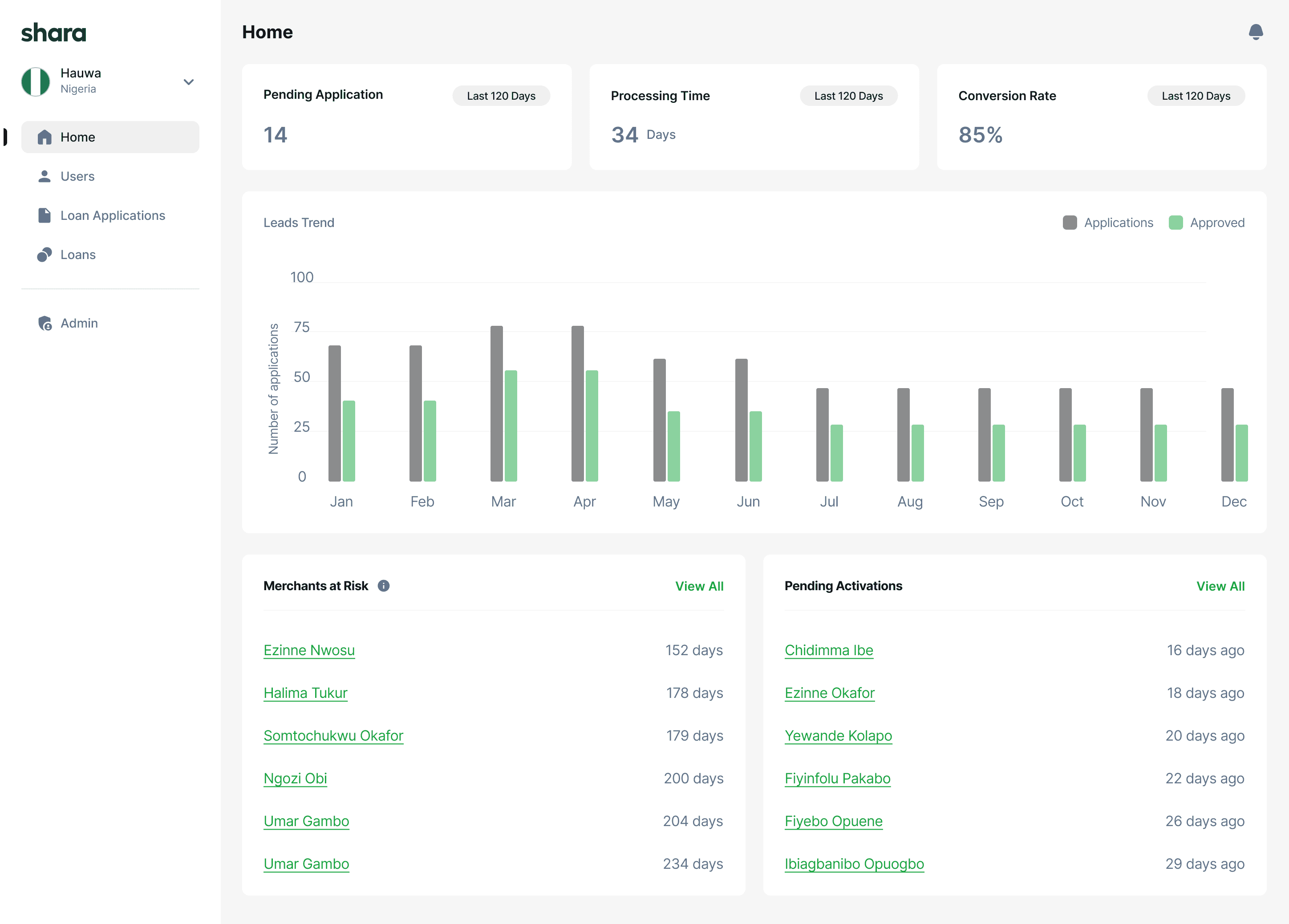
Dashboard: Pending work surfaces first. Alerts and quick actions reduce navigation depth.
The home screen was restructured to show what admins needed most: pending applications, average processing times, conversion rates, and risk alerts. Previously, admins landed on a generic overview and had to navigate to find their queue.
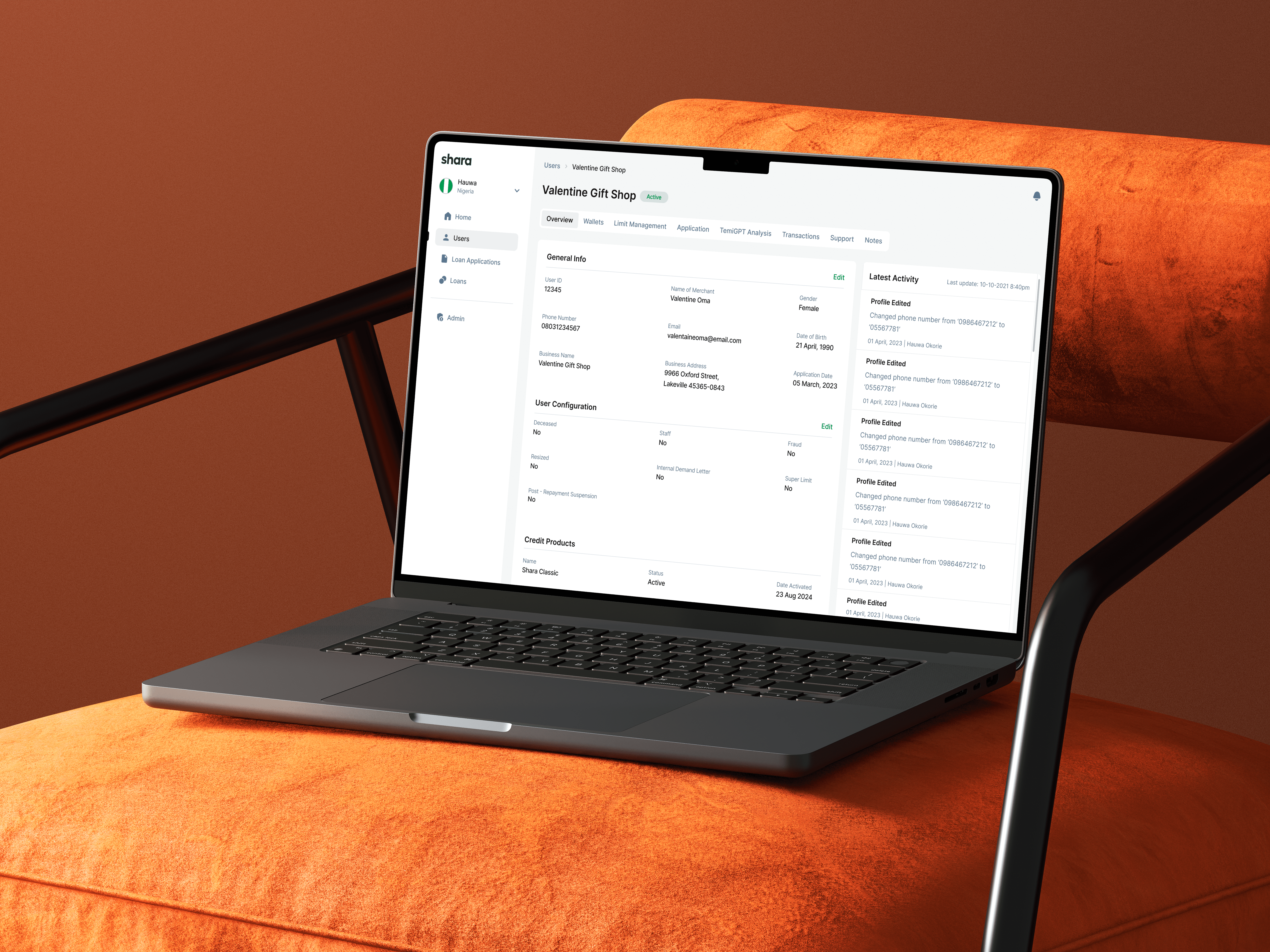
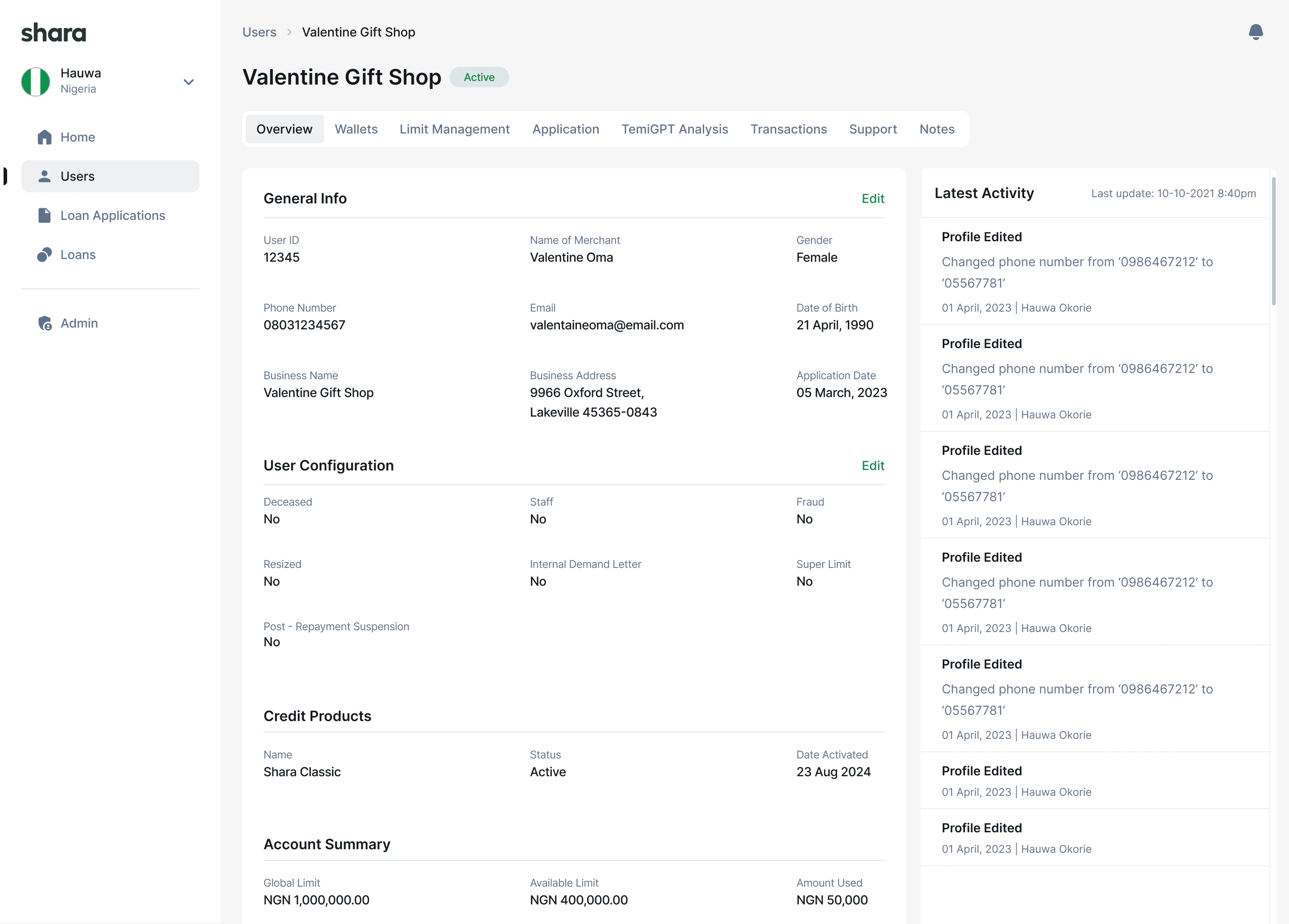
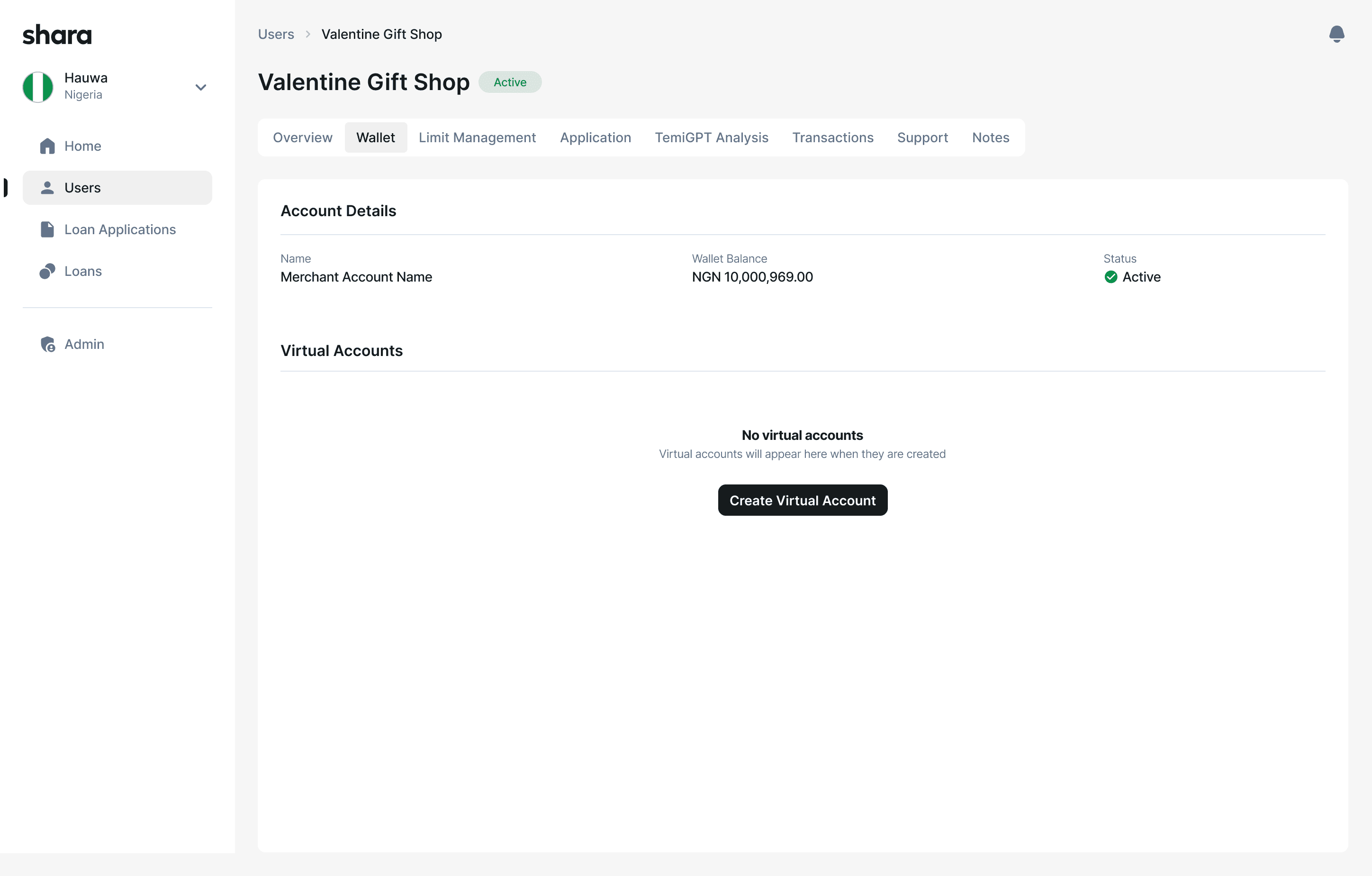
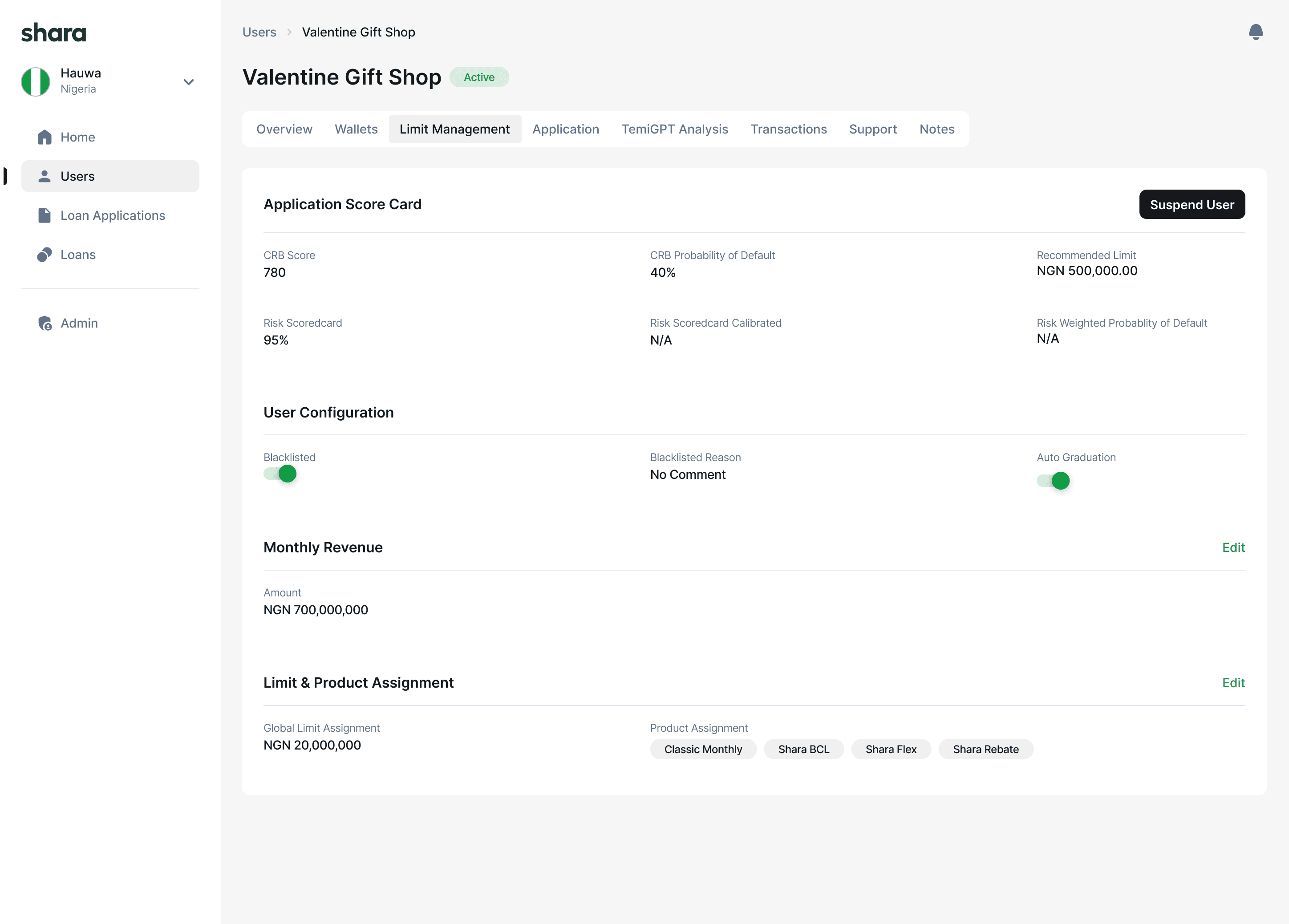
Merchant detail: One structured profile. Everything an admin needs without switching tools.
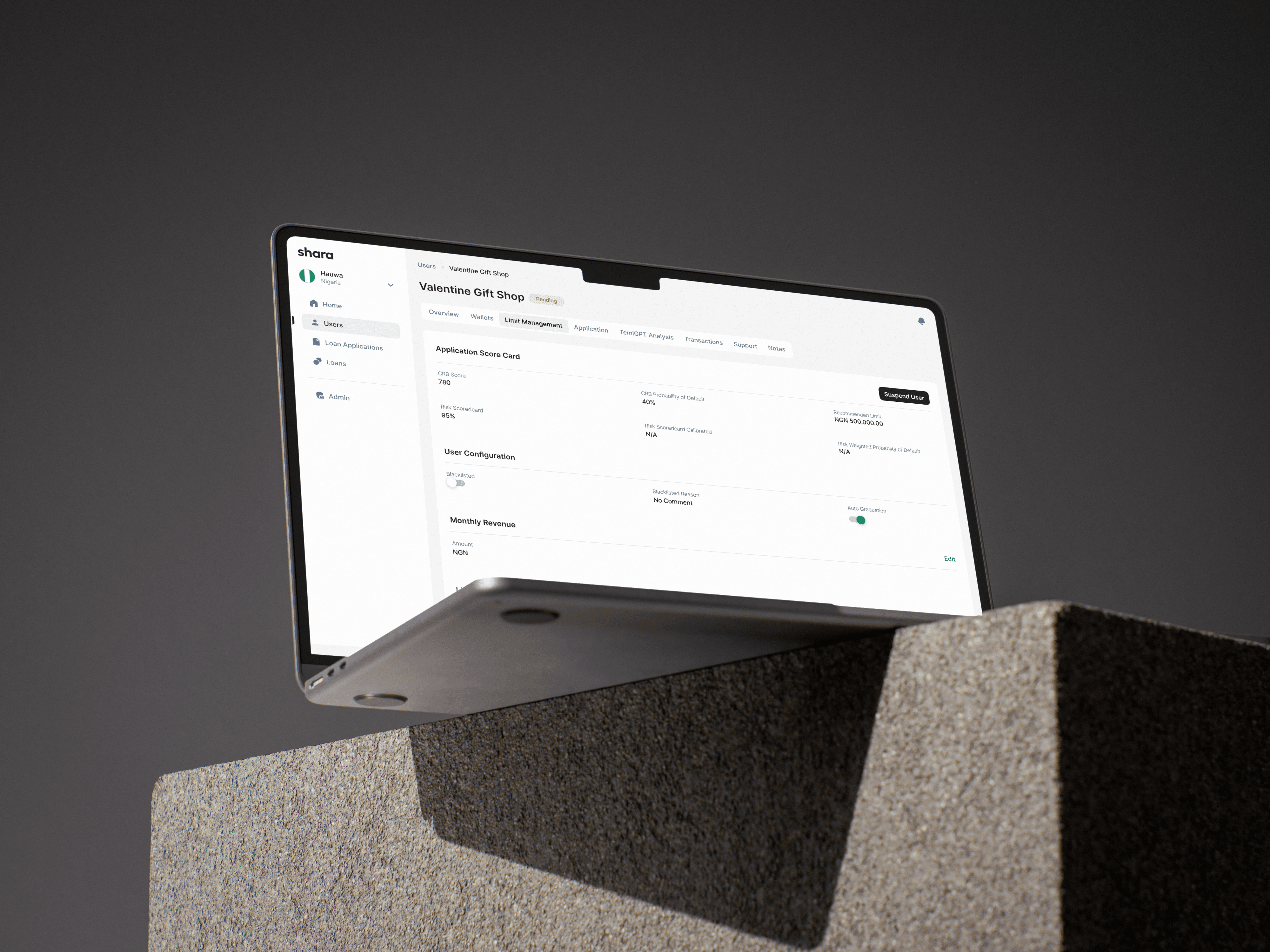
The old user menu scattered critical details across multiple tabs with no clear structure. The redesign introduced a tab-based layout with five clear sections: Overview, Wallets, Limit Management, Applications, and Transactions & Support. Admins stopped cross-referencing and started deciding.
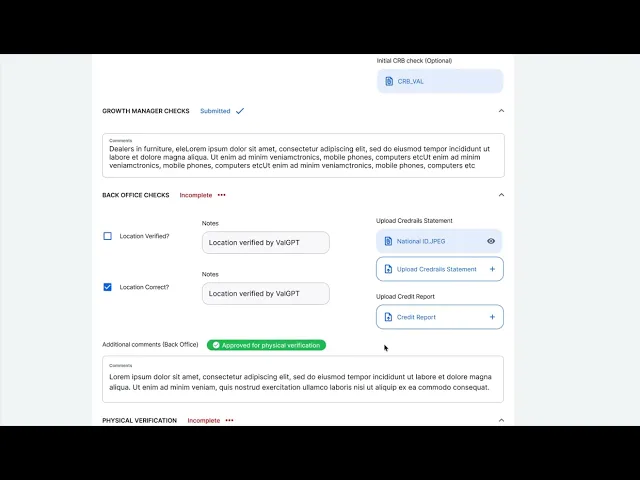
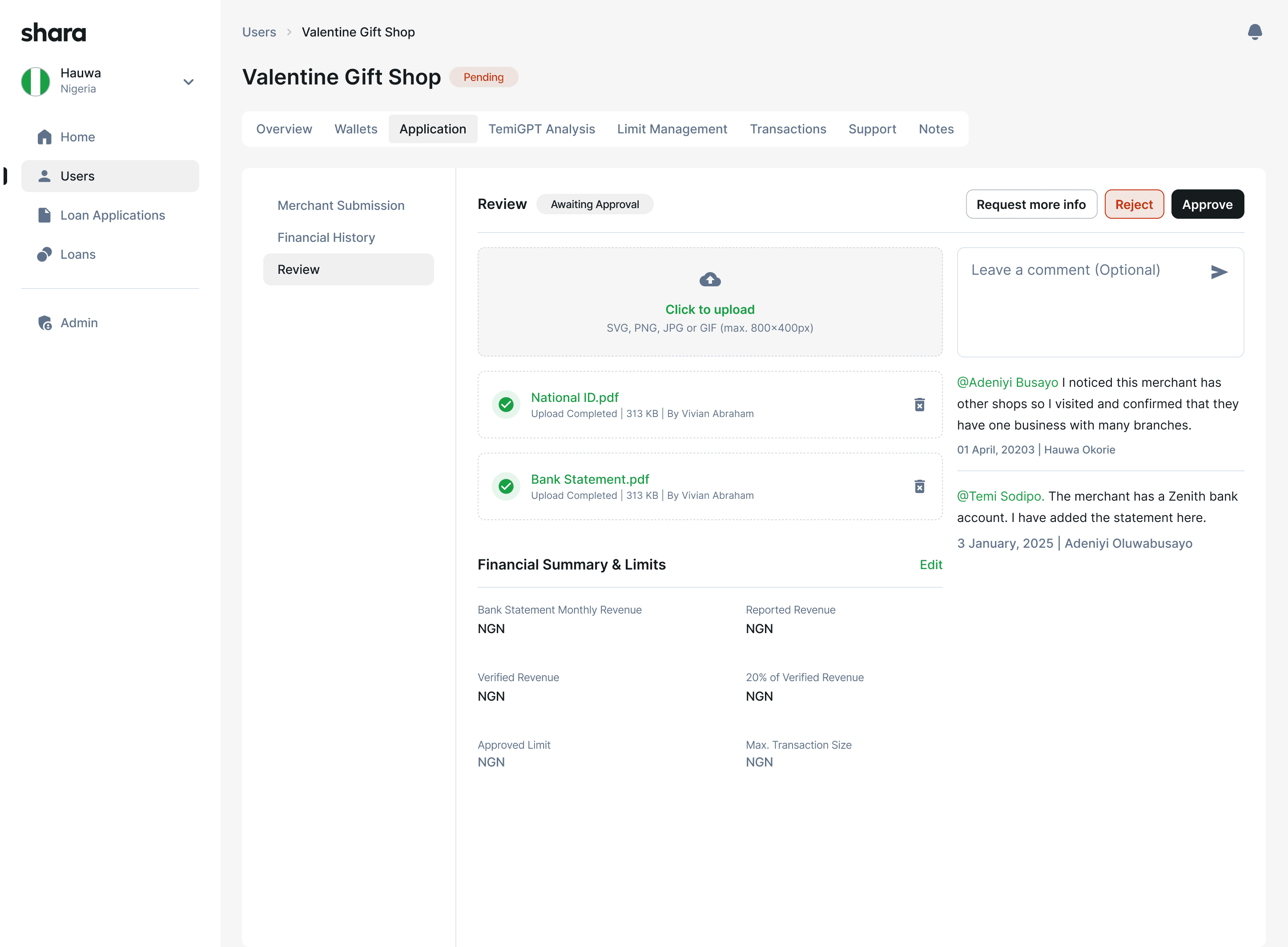
Approval flow: A structured, multi-step review. No external tools required.
Admins could upload and review documents, leave comments visible across admin levels, and take decisive actions (reject, request more info, escalate) with fewer clicks. The approval trail was built into the CRM, not scattered across email threads.
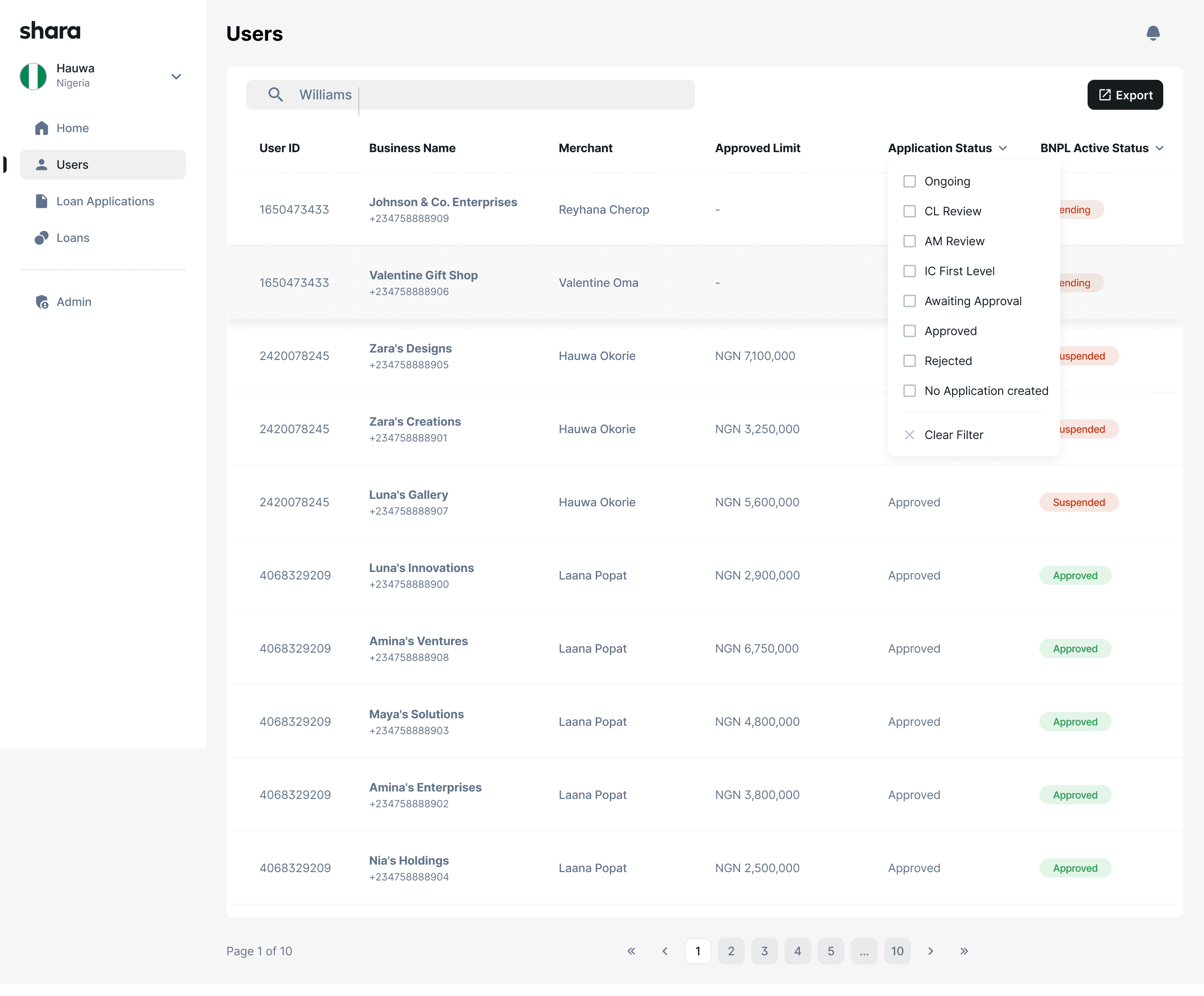
Merchant list: Powerful filtering on a clean, scannable table
The merchant list was rebuilt with consistent column hierarchy, status badges, and multi-parameter filtering so admins could narrow a large dataset to their specific queue without workarounds.
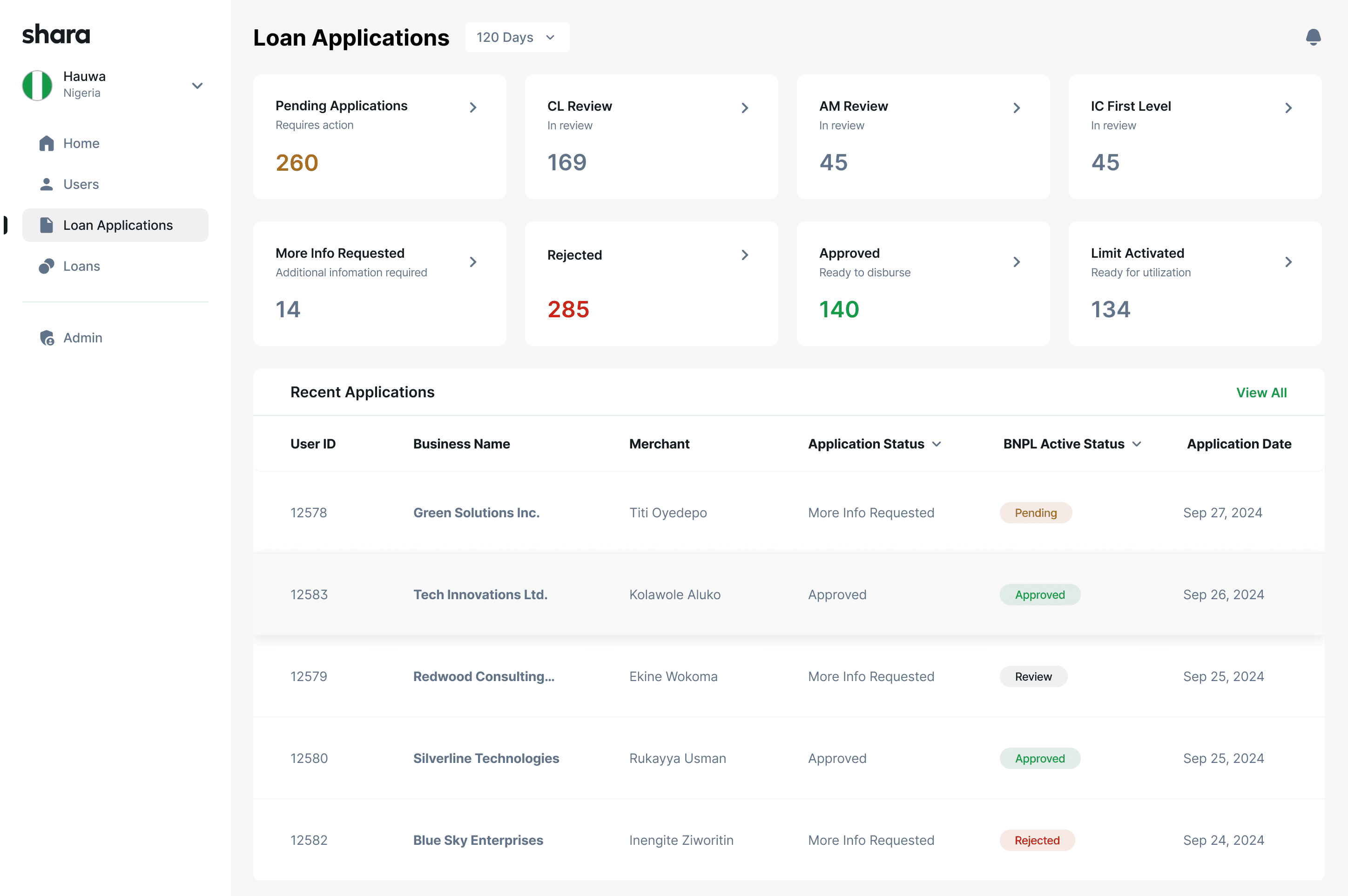
Loan applications: Loan data centralised into a single, filterable view
Previously, loan data was fragmented and time-consuming to search. The redesign centralised everything: application status, approved limits, and activity logs in one table with built-in filtering.
TRADEOFFS
These decisions prioritised long-term scalability over short-term convenience. Not everyone agreed with all of them at the time.
CLARITY OVER DENSITY
Chose less information per screen in critical flows
Some admins wanted more data on one page. We chose clarity over density to reduce errors in high-stakes decisions. Cognitive load matters more than data density in approval flows.
CONSISTENCY OVER CUSTOMISATION
Deferred advanced customisation to protect system patterns
Power users asked for custom views and flexible layouts early. We deferred those to protect the consistency the system needed to be learnable and scalable.
SAFETY OVER SPEED
Accepted slightly more clicks in exchange for fewer errors
Some approval actions now require an extra confirmation step. The tradeoff was deliberate: one extra click is cheaper than a wrongly approved merchant account.
FOUNDATION OVER FEATURES
Prioritised system foundations over feature expansion
The product team pushed for new modules. We advocated for getting the core patterns right first, so every future feature could inherit a solid foundation instead of adding to the fragmentation.
OUTCOME
These decisions prioritised long-term scalability over short-term convenience. Not everyone agreed with all of them at the time.
50%
Reduction in admin review and approval time
1
Unified source of truth per merchant, replacing 7 scattered tools
Hours
Time to onboard a new admin, down from days
This project reinforced the importance of workflow-first design in internal tools.
I learned that:
✅
Systems thinking outlives individual screens
✅
Consistency builds trust in high-risk products
✅
Good internal tools directly impact business growth
It also shaped how I approach platform design today, focusing on clarity, leverage, and long-term scalability.